
Static Residential ISP Proxies for Long-Running Automation: A Practical Guide
Learn when static residential ISP proxies fit long-running automation, how they differ from sticky sessions, and how to validate stable network identity before scaling.
KAIROXO

Static residential proxies are useful when an automation workflow needs a consistent network identity across repeated runs. Think of scheduled checks on an account you operate, recurring quality assurance, or a browser workflow whose network environment should change only deliberately. The useful question is not simply whether an IP is static. It is whether the purchased endpoint, allocation policy, and recovery process meet the continuity your task actually needs.
The KAIROXO Static Residential Network uses fixed ISP-sourced residential endpoints and supports country or state choices where offered. It is positioned for longer-lived identity, while dynamic residential access offers rotation and limited sticky sessions. Package terms remain the source of truth for duration, availability, and whether IP allocation is shared or dedicated. A static endpoint should never be interpreted as a permanent IP or an unconditional guarantee that a website will accept it.
Identify the continuity requirement first
Write down the task boundary before comparing proxy products. Does one run last a few minutes, or must a service return through the same identity tomorrow? Does the workflow contain authentication, a sequence of related requests, and persistent application state? For a read-only daily check on your own service, continuity across days may matter more than changing routes between independent requests. Give each workflow a named endpoint mapping rather than choosing a random proxy every time it starts.
A useful planning record contains the endpoint label, expected location, authorized target, expected run length, renewal date, and a recovery owner. Keep usernames and passwords in the application secret configuration, separate from that record. The mapping is an operational aid, not evidence of exclusive ownership: shared and dedicated allocation are distinct package choices. If the allocation mode is not stated clearly, confirm it before purchasing or attaching a business workflow.
Static identity and sticky sessions solve different windows
A sticky residential session tries to reuse an exit within a configured session window. KAIROXO dynamic residential settings currently offer 5–120 minute sticky sessions, subject to route availability. Static residential service is the more relevant category when the intended identity must span repeated task windows under the purchased plan. Neither setting replaces application sessions, cookies, or account authorization. Keeping an IP stable does not keep a login valid after the application expires it.
Choose limited sticky sessions for a short related sequence that can restart cleanly. Choose static ISP access for recurring work that deliberately maintains a longer-lived network baseline. Rotation is still useful for independent public-page checks whose results do not depend on a previous request. Our rotating and sticky session guide covers those shorter boundaries. Avoid choosing the longest duration automatically: select the simplest mode that satisfies your documented workflow.
Validate a small endpoint baseline
Begin with the connection details returned by your purchased product and follow the ISP documentation and authentication guide. Do not copy a dynamic residential username pattern into another product. Confirm the selected protocol, hostname, port, and authentication behavior with a simple request to a controlled endpoint that reports the observed source IP. Record the exit address and broad location with the time of the observation, then repeat the same check across the task windows you care about.
Separate route checks from business checks. First verify that traffic actually uses the intended exit. Then perform a small authorized read of the target page and assert a meaningful result, such as an expected heading or application response field. An HTTP success alone does not prove that the right content arrived. Measure completed task runs, timeouts, and identity changes rather than treating a connection benchmark as a promise of business success.
A practical long-running workflow
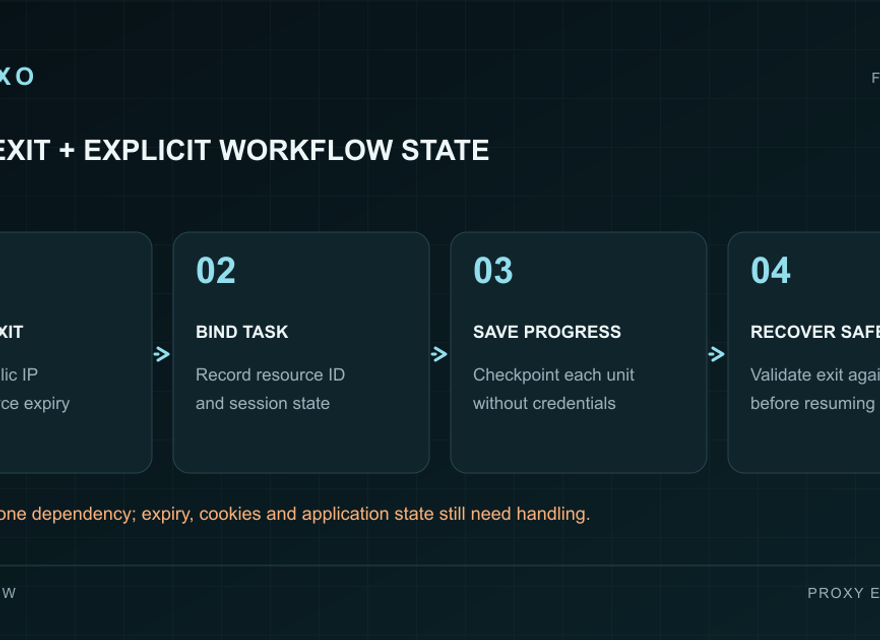
The diagram shows a workflow label linked to one configured ISP endpoint, with validation at the start of each scheduled run. A run uses its own application state and records a checkpoint when its read-only work completes. Renewal and recovery sit beside the schedule, so a package expiry or changed route is handled deliberately. This pattern is an implementation example, not a guarantee that an endpoint will never change. Test it with your selected plan and actual target behavior.
Keep application state and route ownership aligned
Use a stable mapping between the workflow, its browser or HTTP client state, and its endpoint. A scheduled process should restore the appropriate application state before continuing related work; another unrelated workflow should receive its own state boundary. This reduces accidental mixing of cookies and task history. It does not require a new IP for every process, and it does not authorize an application to exceed the purchased concurrency or target service limits.
Plan expiration and route recovery explicitly
Treat package renewal as part of the workflow schedule. Check expiry and available endpoints before launching a long job. If a route becomes unavailable, pause related work, identify the last confirmed checkpoint, and revalidate the replacement before resuming. A replacement may have a different exit identity. Do not automatically replay actions that can create duplicate records or side effects. For read-only tasks, bounded retries and a clear failure record are usually easier to reason about.
Keep recovery logs useful and limited: endpoint label, timestamp, error category, task checkpoint, and observed route change. Exclude passwords, cookies, authorization headers, and personal page content. If you need a browser implementation, the Playwright proxy guide explains context boundaries. For a smaller HTTP workflow, start with the Python Requests integration guide. Both still need your product-specific connection settings.