
Rotating vs. Sticky Residential Proxy Sessions: How to Choose
Choose rotating or sticky residential proxy sessions by task continuity. Learn how to validate exit behavior, plan session duration, and recover safely when a route changes.
KAIROXO

A residential proxy session is a routing choice with consequences for the whole workflow. Independent requests to public pages often benefit from rotation. A sequence that expects the same network identity usually needs continuity. Choosing the right mode means understanding which requests belong together, how long the sequence takes, and what your application should do when an exit becomes unavailable.
KAIROXO dynamic residential proxies offer per-request rotation and sticky sessions from 5 to 120 minutes, subject to route availability. This guide explains how to choose between them, configure a small test, and measure the behavior that matters before adding traffic. Current settings and available locations should always be confirmed in the console and the dynamic residential product page.
What changes when you rotate an exit?
In rotating mode, the proxy can select a residential route for each request. This suits work where one response does not depend on the identity used for the previous response: checking permitted public product pages, collecting independent public records, or observing availability across a market. Rotation changes the network exit; it does not change the URL, application logic, browser configuration, or any state your client already holds.
Per-request routing should not be interpreted as a guarantee that every response comes from a previously unseen IP. A pool is a finite set of available routes, and selection is affected by location filters and current availability. Record observed exits during your pilot rather than assuming a uniqueness ratio. If you need repeated measurements from the same vantage point, rotation may introduce an extra variable into the comparison.
What a sticky session keeps consistent
A sticky session requests reuse of an exit for a limited period. Reusing the generated session identifier can support a permitted sequence such as opening a localized page, following an internal link, and checking the next page with the same network vantage point. Choose a session length that covers the expected sequence, rather than automatically choosing the longest setting.
An exit IP is only one part of application state. Cookies, request headers, local storage, and account state remain the responsibility of your client. A proxy session does not sign you in or preserve browser storage. MDN's cookie guide describes how cookies carry application state between requests; keep that state consistent separately when your test requires it.
Session design
Design the session around one logical task
Start by naming the unit of work: one independent page check, one authorized browser journey, or one regional monitoring run. Assign a distinct session identifier to each journey that needs continuity. Within that journey, keep the selected region, protocol, generated credentials, and client state consistent. Start a new session when the journey ends or when its routing context is deliberately changed.
Avoid sharing one sticky identifier across unrelated workers simply because it is convenient. Their requests become harder to interpret, and a routing problem may affect several tests at once. Conversely, creating a fresh identifier for every step defeats the continuity you selected. A useful mental model is one logical task, one session context, and an explicit completion or restart point.
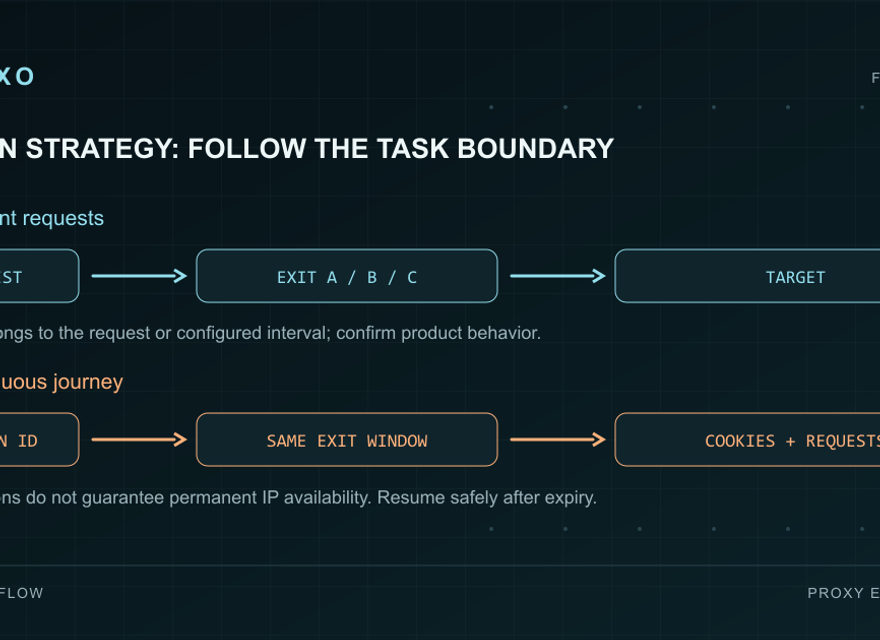
Choose a mode with a simple decision rule
Use rotation when requests are independent and the result does not require a stable exit. Use a sticky session when later steps depend on the same network vantage point. For example, repeated observations of a public localized storefront may need continuity during each observation run, while independent checks of unrelated public URLs may use rotation. Both are legitimate designs when they match the site's permitted access and your own test requirements.
If the workflow needs a longer-lived ISP-backed identity beyond a dynamic session, evaluate static residential proxies. Dynamic sticky sessions and static products serve different time horizons. Also assess cost using measured transfer volume and the current plan rather than treating session duration as a billing estimate. The bandwidth comparison guide explains that separate decision.
Configure and validate a small pilot
First, select the required country and any available region, city, or ASN filters in the console. Narrow filters can reduce the set of eligible exits, so only request the detail the task actually requires. Generate credentials for the chosen rotation mode or sticky duration and use the returned endpoint. Do not invent a username suffix or copy another account's gateway; the residential documentation and quickstart provide the integration path.
Next, send a small number of requests to an IP-check service you are allowed to use, then test the intended public destination. For a sticky pilot, repeat observations within the selected duration and record the session label, observed IP, time, response status, and elapsed time. For a rotating pilot, record changes across requests without making every change a pass/fail requirement. Keep passwords and full credential strings out of logs.
Finally, repeat the actual sequence with a consistent client. A successful IP-check request proves basic routing, not that the target workflow succeeds. Check whether links, returned language, and expected content remain correct across the journey. Hold concurrency and location constant while comparing modes, then change one variable at a time. This makes failures attributable and avoids mistaking a workload change for a routing improvement.
Handle expiry and route changes deliberately
Dynamic residential exits can become unavailable, and a sticky duration is not a promise that a residential device will remain online. Define a recovery boundary before production use. If the exit changes during a sequence that requires continuity, mark that sequence as interrupted, create a new session, and restart from the appropriate application step. Do not merge observations from two exits into one uninterrupted test result.
Apply bounded retries with backoff and distinguish proxy authentication failures, target rate limits, and network timeouts. Switching IPs is not a general remedy for a target's access restrictions. Check the proxy troubleshooting guide for failure classification, and confirm permissions and target limits before raising concurrency. Track successful completed tasks alongside bytes transferred, latency, and interrupted sessions.