
4G/5G Mobile Proxies for App and Mobile Web Testing: A Practical Workflow
Build a repeatable mobile testing workflow with carrier exits, route checks, controlled browser profiles, and clear boundaries between proxy routing and real-device testing.
KAIROXO

Mobile proxies help teams test what an application or website receives from a carrier-backed network route. They are useful for checking your mobile-facing content, regional responses, or an authorized ad placement without assuming every visitor arrives from a datacenter. The proxy changes the route used by configured traffic. It does not turn a desktop browser into a physical phone, move a device’s GPS position, or guarantee that every native application will send its traffic through that proxy.
The KAIROXO Dynamic Mobile Network provides mobile carrier routes with rotation or sticky-session choices and location or operator targeting where currently available. The product covers 3G, 4G, and 5G exits; the actual network type depends on the endpoint. For a 4G/5G test requirement, confirm that the chosen route meets it. Coverage headlines alone do not prove that a specific country, carrier, or network generation is available in your selected package.
Define the network question you want to answer
Start with one hypothesis: for example, your own mobile landing page should return the expected language and catalog when accessed through an available route in a chosen country. Define the target URL, expected response, browser profile, account state, and route selection before the run. Keep a direct-connection baseline. Compare one variable at a time so a failed assertion can be attributed to the network route, application logic, or a separate client setting.
A browser profile and a carrier exit are separate dimensions. Hold the profile constant while comparing routes, then hold the route constant while comparing desktop and mobile profiles. Browser tools can separately configure viewport, locale, timezone, and geolocation, as described in the Playwright emulation documentation. Do not infer those settings from an IP address, and do not let an old language cookie silently override the experiment.
Verify the configured traffic actually takes the route
Generate the connection details from the mobile product you have purchased, then use the quickstart and authentication documentation. Confirm the supported protocol, hostname, port, and credentials rather than inventing an operator suffix or copying another product’s username format. Make an initial request to an endpoint you control that reports the observed source IP. Log its broad location and ASN when available, with the selected route label and observation time.
An IP lookup is evidence about the exit seen by that endpoint, not proof of a device’s radio, GPS position, or exact physical location. Native apps and individual network libraries may use different proxy controls or ignore a system proxy. Verify the traffic path in the application you are actually testing, not only in a separate browser. If the app offers no supported proxy configuration, do not assume a browser setup covers its background requests, other protocols, or embedded components.
Build a small, reproducible test matrix
Start with three controlled cases: a direct connection using the chosen mobile browser profile, the same profile through one confirmed carrier route, and the same route with a desktop profile. Use a fresh test context or an intentionally restored state for each case. Record the expected content language, selected market, response status, and one meaningful application assertion. If your chosen plan exposes operator targeting, add a second available operator only after the initial cases are repeatable.
For a page you own, assert the rendered heading, available plan text, or localization key in the DOM. For an authorized ad check, record the expected placement and a redacted outcome. A successful TCP connection or HTTP 200 is insufficient if the application returns an error page or the wrong market. The website localization testing guide explains how to keep network location, language preferences, and content expectations distinct.
The route is one controlled part of the test
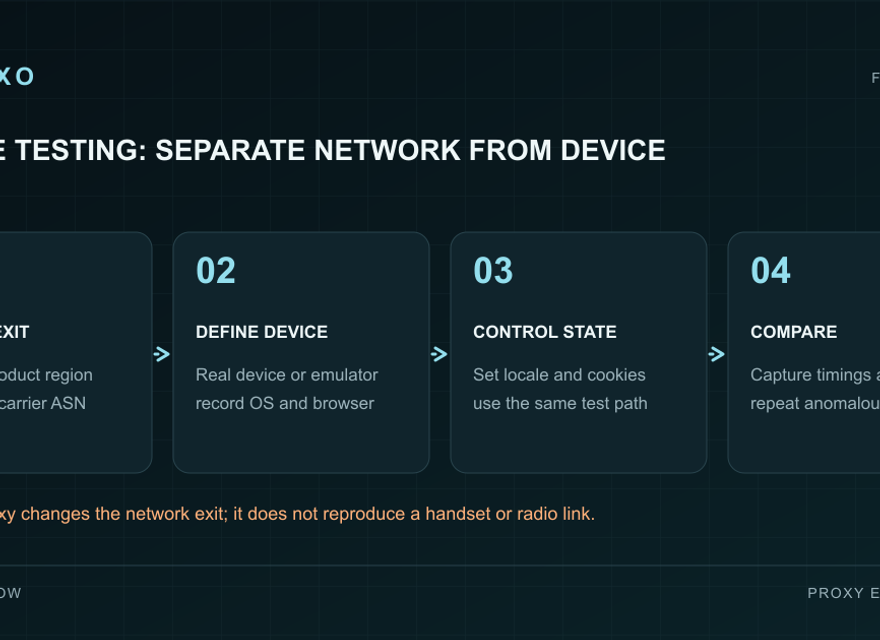
The workflow diagram separates the browser or app configuration from the carrier exit. First confirm that the selected traffic uses the route; then run the application assertion while keeping locale and account state intentional. Store a redacted result and repeat the same case. If a test needs physical-device behavior, send it to a real-device test track rather than interpreting a proxy result as proof of handset behavior. This separation makes failures easier to reproduce and explains exactly what a successful test established.
Choose rotation or continuity around the test case
Use continuity when a multi-step test needs one coherent route from the first page to its final assertion. Use rotation for independent comparisons that explicitly need different exits. The available mobile session choices and duration should be confirmed in the console; do not assume the dynamic residential product’s session range applies to mobile. A sticky route can become unavailable, so the test should report that condition rather than silently changing identity halfway through.
Keep real-device coverage as a separate requirement
A mobile route and a mobile-looking browser profile do not cover touch hardware, sensors, OS integration, radio handoffs, or native app behavior. Browser device modes approximate selected client characteristics, as the Chrome device-mode documentation explains. Keep real-device tests for issues that depend on physical hardware or the operating system. Likewise, do not use a carrier proxy’s timing as a measurement of your phone’s 5G speed or signal quality.
Control cost and preserve useful failure evidence
Begin with a limited number of pages and cases, then record transferred data and completed tests. Mobile packages are traffic based; inspect current GB allowances, location choices, and session terms instead of relying on an old starting price. Media-heavy pages can consume more data than a simple API check. When failures occur, distinguish authentication errors, target rate limits, timeouts, and wrong content. Save route labels, times, and assertion results without credentials or personal data; see the proxy troubleshooting guide.