
Geo-Targeted Proxies for Website Localization Testing
Build a repeatable localization test with geo-targeted proxies. Control language and browser state, verify exit location, and check regional content with DOM assertions.
KAIROXO

A translated page can still show the wrong currency, market availability, redirect, or regional message. Localization testing therefore needs more than a language switch: it needs a controlled way to compare the network location and the client settings that affect the result. A geo-targeted proxy supplies a regional network vantage point, while your test controls the browser or HTTP client.
KAIROXO dynamic residential proxies support location filters when those routes are available, with rotating and sticky-session options. They can help teams test their own sites and other destinations they have permission to assess. This workflow explains how to build a small regional test matrix, verify routing, preserve evidence, and distinguish a localization defect from a network or session issue.
Separate network location from language preference
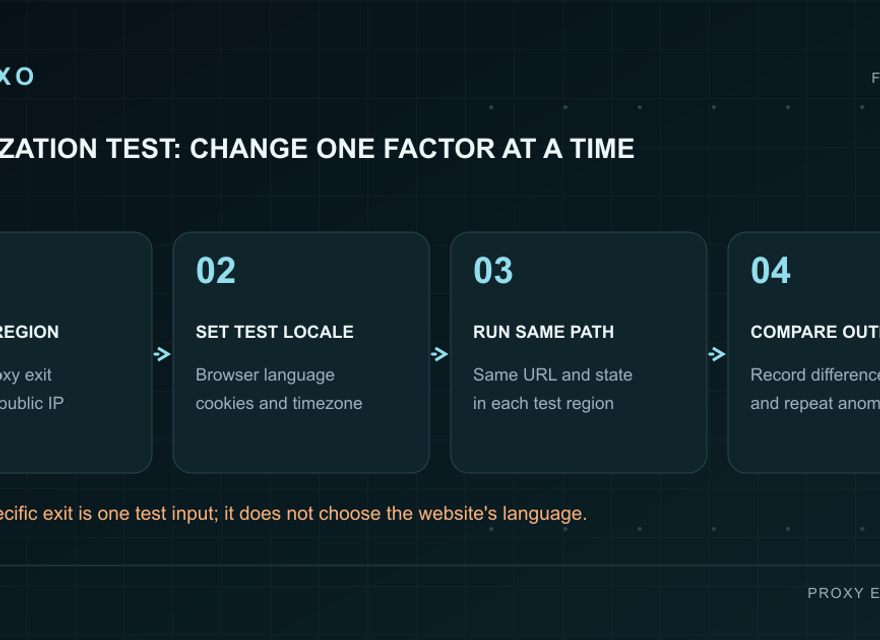
An IP location does not determine every localization signal. A site may also use its URL, explicit language selection, cookies, account settings, or browser preferences. Test these signals deliberately. If you change the proxy country and the language preference together, a different result cannot tell you which setting caused the change. First establish a baseline, then change one dimension while holding the others steady.
The Accept-Language header expresses the client's preferred language; it is a signal a server can use, not a guarantee of a particular response. Check how your site handles explicit language selection separately. For example, test Vietnamese content from more than one available network region to confirm that a user-selected language remains respected.
Build a regional test matrix
Define a small matrix before generating credentials. Each case should name the page, requested network region, language, browser profile, expected behavior, and evidence to collect. Start with the markets your product actually serves and the routes available in the console. Do not add city-level precision unless the behavior under test depends on a city; broader filters usually make the pilot easier to interpret.
A practical first set contains a default landing page, a product detail page, and a localized support or documentation page. For each, check a fresh visitor and a visitor who explicitly selected a language. Expected results can include the correct heading, currency label, regional availability message, redirect destination, and working internal links. Write these expectations before running the test so that a surprising response does not quietly become the new baseline.
Localization workflow
A repeatable regional observation workflow
Create one run identifier for each matrix case and keep its routing and client configuration together. The flow is: choose an available region, generate proxy credentials, verify the observed exit, apply the intended locale settings, request the page, and evaluate the result. A multi-page journey should retain one session context so that each step represents the same regional observation.
Save a compact record containing the requested region, observed exit location, time, language setting, final URL, response status, and the relevant content assertions. Also record whether the browser was fresh or had an explicit preference. Keep credentials out of evidence. This record lets another engineer reproduce the observation and tells you whether two runs are truly comparable when an issue reappears.
Configure the proxy without guessing parameters
Select the required country in KAIROXO and add region, city, or ASN filters only when they are available and necessary. Generate credentials using the protocol supported by your client and use the returned endpoint. Refer to the geotargeting documentation for the supported settings, and the curl setup guide when validating an HTTP or SOCKS5 client.
Choose a sticky session for a related browsing journey that needs a consistent exit, such as opening a landing page and following its localized product link. Rotation is useful for independent observations, but it introduces different exits into repeated measurements. The rotation and sticky-session guide explains that distinction. Confirm actual behavior with a small pilot before scheduling a larger regional suite.
Verify location before judging page content
Start with an IP-check request and verify the observed country or other required geographic detail using an appropriate location source. Record both the requested filter and what the verification reports. IP geolocation databases can disagree, so a city-level mismatch should be investigated rather than automatically treated as proof that the application's localization logic is broken. Recheck the chosen route and compare the site's own regional decision when possible.
Then request the target page with the same configuration. Inspect the final URL after redirects and distinguish the proxy response from the destination response. A successful routing test does not prove that all target pages load correctly. Conversely, a failed page request does not prove the region filter is wrong. The proxy error guide helps classify authentication failures, rate limits, and timeouts before they become localization tickets.
Assert behavior with DOM and response checks
Use structured checks wherever the behavior is observable in HTML or HTTP responses. Assert the page's language attribute, main heading, expected currency text, regional message, canonical destination where relevant, and links reached through the normal navigation. Test a mobile viewport as well as a desktop viewport when responsive components expose different navigation or content. Capture just the relevant values rather than relying on a screenshot to explain every difference.
For pages with client-side localization, wait for the site's normal content-ready condition and assert the updated DOM. Keep device settings, timezone, and application permissions explicit when the feature depends on them. A network proxy does not set the browser's timezone or grant geolocation permission. If the application uses device location, create a separate controlled test for that signal instead of attributing its behavior to the proxy IP.
Repeat carefully and turn results into fixes
When a case fails, rerun the smallest relevant sequence with the same client settings and a verified route. Separate reproducible content differences from transient failures. An issue record should include the expected and actual values, the matrix case, timestamps, and enough configuration to reproduce the test without exposing secrets. Compare the same case after a fix, then run related language and region cases to catch regressions.
Scale by completed cases and useful coverage, not by raw request count. Bound concurrency, respect destination limits, and estimate transfer volume from the pilot. Use the billing-model comparison when choosing between traffic-based and duration-based access for a recurring suite. Maintain a concise matrix so that newly added languages receive meaningful checks rather than an unreviewed expansion of combinations.